Addovation Share for Office - White Paper
Last Updated: 2025-11-27
Introduction
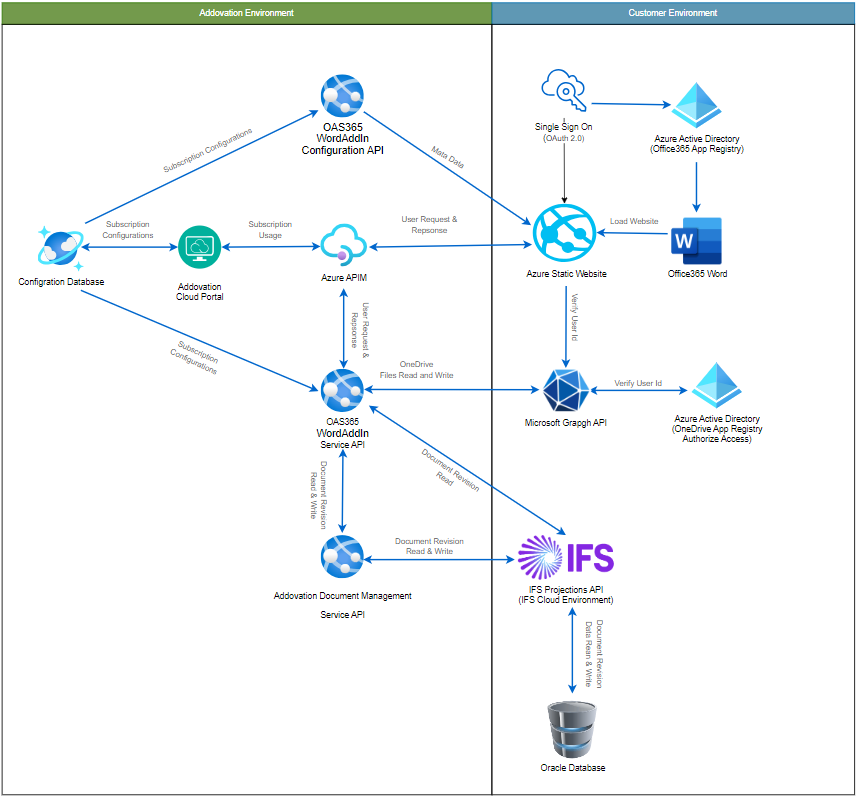
Addovation Share for MS Officeis build using modern web technologies and will rely on Addovation APIs or IFS Projections. It is a cloud-based solution which is is compatible with bothmacOSandWindows. Users can take advantage of this web app directly from their macOS or Windows environment.This add-in supports
Check-in word/excel/powerpoint documents as Document Revisions in IFS CloudandConnect documents to Object Connection(s).It uses
Microsoft Graph APIfor handling the communication with Exchange online.
In Share Word Add-in, users could perform:
- Check-in document(s)
- Connect Object Connections
- Create View Copy
- Release Document
Any customer with supported IFS versions could subscribe to Share Word Add-in product via Addovation Cloud Portal through a key account manager in Addovation and customize their preferences to experience the features in Share Add-in. Usage reports can be fetched using the portal on daily or monthly basis.
Architecture
Share Word Add-in System Architecture
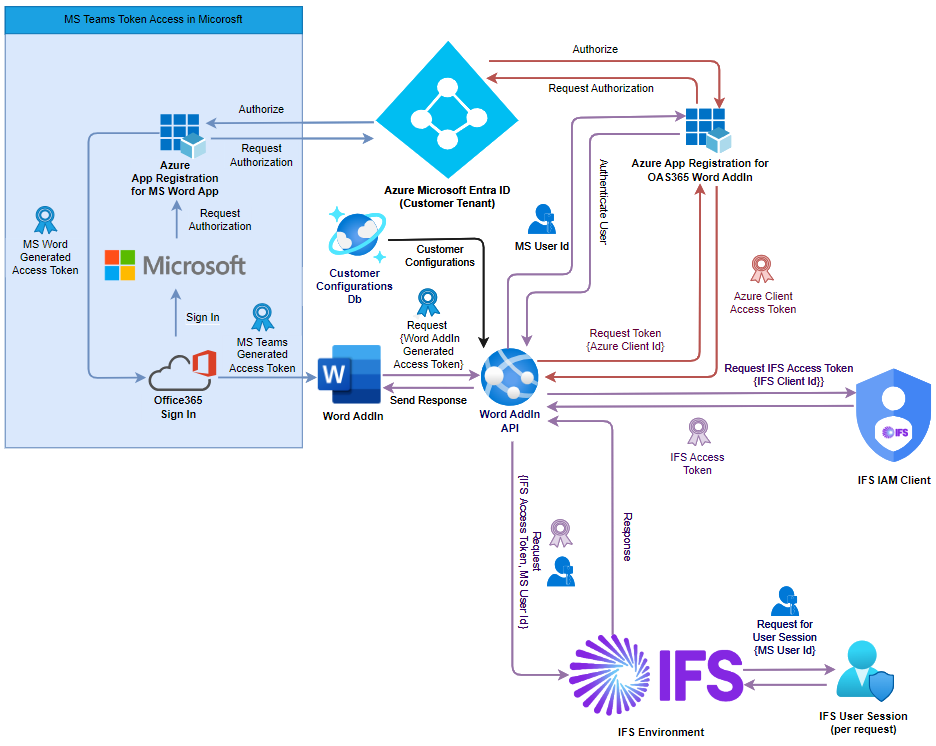
Share Word Add-in User Authorization Architecture
Requirements
Subscription Requirement
A valid subscription key from Addovation Cloud Portal is required to provide authorized access to Share Add-in Service API and Addovation Document Management Service API. Please contact your Addovation Key Account Manager for more information.
Addovation Share for MS Office Add-in Application Requirements
Share Add-ininvolves setting up aShare for MS Office Add-in Applicationusing anorganizational user account. This integration is then installed within a Microsoft Word, allowing users to utilize the application seamlessly within the Office365 environment.
Azure Requirements
- Azure Service is required to publish Share Add-in in client application.
- Azure Resource Group is required to create Share Add-in app registration.
- Access documents via Microsoft OneDrive, the details of an app registration (Tenant Id, Client Id, Client Secret, resource) in Azure AD should be provided. Required API Permissions should be assigned to that app registration.
- Azure AppInsight Key is required to register logs in Azure AppInsight.
Networking Requirements
- IFS server URL must be accessible for
Share Word Add-in Service APIendpoints andAddovation Document Management Service APIendpoints.
Azure Configuration Requirements
If customer wish to publish Share Add-in client on their premise, an azure portal is required with a subscription and subscription pricing plan which allows to create and maintain following resources;
- Resource Groups
- Azure App Service
- Azure Insights
- Log Analytics Workspace
Windows Operating system should support in azure portal alone with .Net 7 or higher for app services.
Azure AD App Registration
IFS Information Requirements
- The service requires IFS server URL.
- Provided permission-set must be installed and users should be granted with relevant permissions.
- IFS projections should be published, and endpoint must be presented along with required fields to configurations.
- Data CRUD operations are performed using IFS projections, therefore
Share Word Add-in Service APIendpoints andAddovation Document Management Service APIendpoints must be whitelisted in IFS environment. - A background job and indexing in the Oracle database needs to be put in place.
IFS User Access Requirements
- To enable service user access for reading and writing data in the
IFS environment, customer needs to provide the following IAM (Identity and Access Management) client information:Client ID, Client Secret, and Realms. These credentials will facilitate secure interaction between the service user and the IFS environment.
IFS Support Requirement
We currently support the following ERP systems:
- IFS Cloud™ 21R1, and later
IFS Projections Publish Requirements
If Addovation publishes IFS projection on behalf of customer, then following information and setups needs to be in placed
A pre setup
Build PlaceCustomer Repository Information
VPN Profile Information
Test/Dev Environment
GDPR Compliance
Share for MS Office Add-in from Addovation obeys regulations controlled by GDPR and communicates in the same way as IFS Cloud.
The information that are stored by Share Add-in Client in Azure Insight logs are;
- Status Code
- Tenant Id
- Client Instance Name
- User Id (Email Id)
- Access Method
- Log Message
Information that are stored by Share Add-in Service API in Azure Insight logs are;
- Status Code
- Tenant Id
- Client Instance Name
- Access Method
- Log Message
Share Add-in requires above information to monitor logs information, errors and warnings as per certain situation such as fail to search results or process any other functionality or IFS server does not response etc..to evaluate the reasons that stopped processing a user request.
Limitation
- A single tenant can have one Share Add-in Application.
- Any IFS return error or empty results will return as
200code range to Azure APIM gateway. - Subscription access monitoring is performed by
Azure APIM. - Share Add-in applies same restrictions and validations as configured IFS application.
- Basic Data should be available before hand in IFS application to support full flow of the Share Add-in.
- The Product allows one document to check in at a time along with a view copy.
- Word Document extensions should be available in
IFS EDM Basicfile types to check in. - PDF Document extensions should be available in
IFS EDM Basicfile types as view copy. - Documents with markdown syntax and file types might not check in to IFS through Share Add-in.
- Only the files with a document size below 35MB are permitted for check-in.
- The Addovation Share Add-in is not supported in the Outlook classic (legacy) version of Outlook. It is only compatible with the Outlook (New) & Outlook (Web) as modern add-ins are not fully supported in Outlook Classic.
Contact
- For further inquiries, please visit www.addovation.com
- For existing customers, please use http://support.addovation.com