Addovation DocAgent - White Paper
Last Updated: 2026-08-25
Introduction
Schedule Basis Addovation DocAgent solution monitors any incoming e-mail on Office 365 accounts specified by the customer using Microsoft Graph API. Once the service detects a new e-mail, it automates the process of creating a new object or updating an existing object to the customer in agreed IFS application.
Each e-mail account belongs to a channel. A channel has its own configuration setup including Tenant information, IFS access details (encrypted), email accounts configurations (encrypted), service endpoints, IFS projection endpoints, document management configurations, auto reply to configurations, error handling policy, GDPR compliance policy and cache duration.
Furthermore, it allows to check-in email message files as MSG or EML format and e-mail attachments independently to IFS Document Management and refer them to the object which has been created or updated by DocAgent. Once a new object has been created, it sends an automated reply using SMTP protocols or Microsoft Graph API to the sender with object reference number if auto reply is configured. It also allows filter and block e-mails based on configurations provided by the customer.
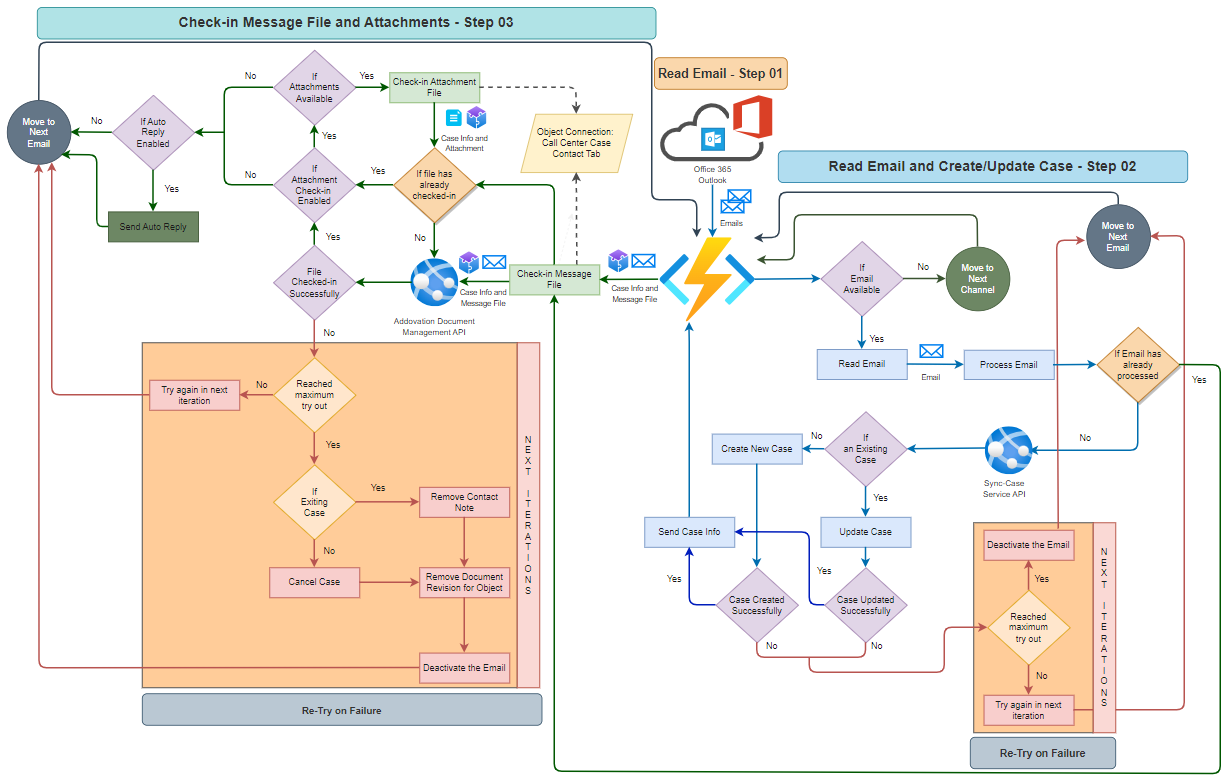
Addovation DocAgent allows to deactivate or suspend an e-mail on occurrence of multiple failures based on customer configured error handling policy.
Addovation DocAgent has provided ability for users to monitor log history based on queries using Azure Insights and Log Analytics Workspace.
Any customer could subscribe to Addovation DocAgent product via Addovation Cloud Portal and customize their preferences to automate whole process based on their configurations. Usage reports are available in portal on daily or monthly basis. Multiple channel access requires multiple subscriptions and each subscriptions allows to access Addovation DocAgent service API as well as Addovation Document Management Service API. Both API gateways are managed by Azure API Management.
Architecture
Addovation DocAgent System Architecture
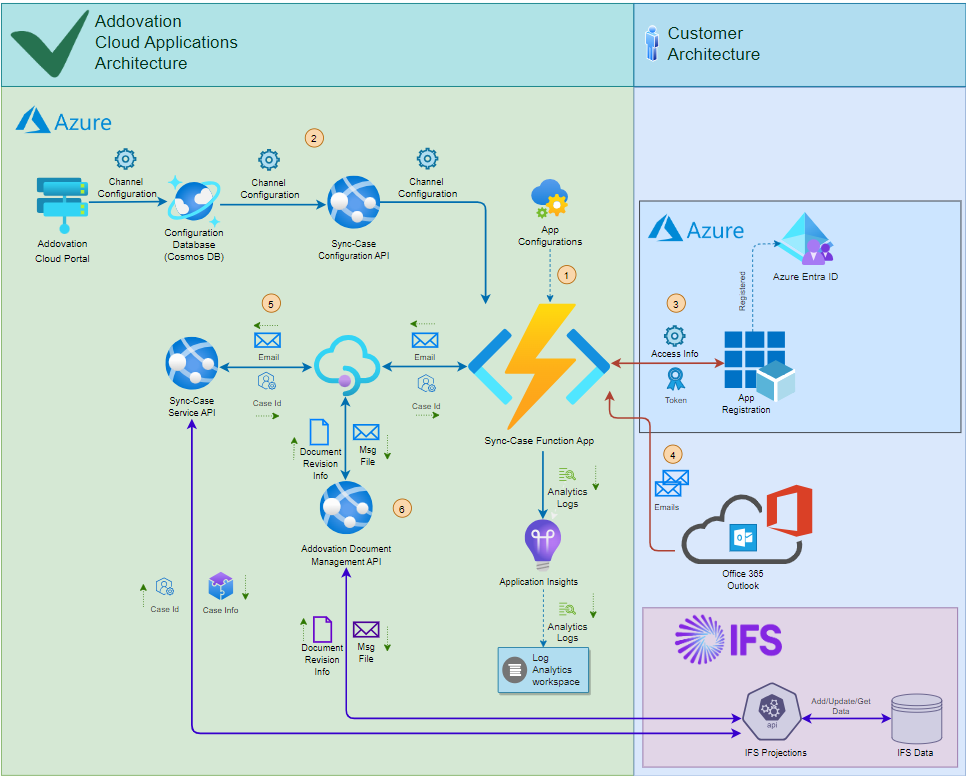
- Essential configurations required for the Function App are stored in its environment variables.
- Environment-related details are retrieved from subscription configurations.
- An access token is requested via Azure App Registration.
- The access token is used to fetch all emails from the inbox.
- Each email is processed to either create a new case or update an existing one.
- Message files and attachments (if configured) are checked-in into the corresponding created or updated case.
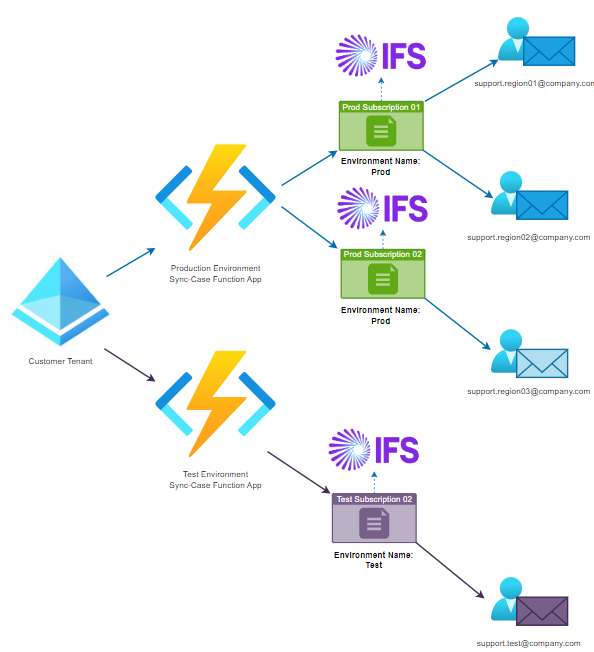
Addovation DocAgent - Multi Environment Support
Addovation DocAgent - Functional Flow
Addovation DocAgent - E-Mail Authentication
Addovation DocAgent support three different authentication for email account
- Multifactor Authentication (MFA) Support – Certificate-Based Authentication
- oAuth2 Authentication Support – Token-Based Authentication
- Basic Authentication Support - With User Credentials
Multifactor Authentication Support (MFA)
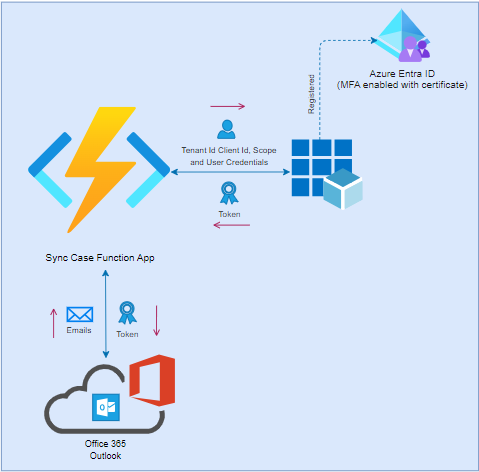
A secure and automated certificate-based authentication approach is implemented for MFA-supported email accounts. This solution, designed to work seamlessly without user interaction, utilizes Microsoft Graph API for access and operations. The certificate, managed by the customer, is securely stored in the Azure Portal (via App Registration and Key Vault). Customers retain full control and can restrict email account access anytime by removing the certificate from the associated Azure resources.
MFA Authentication Architecture
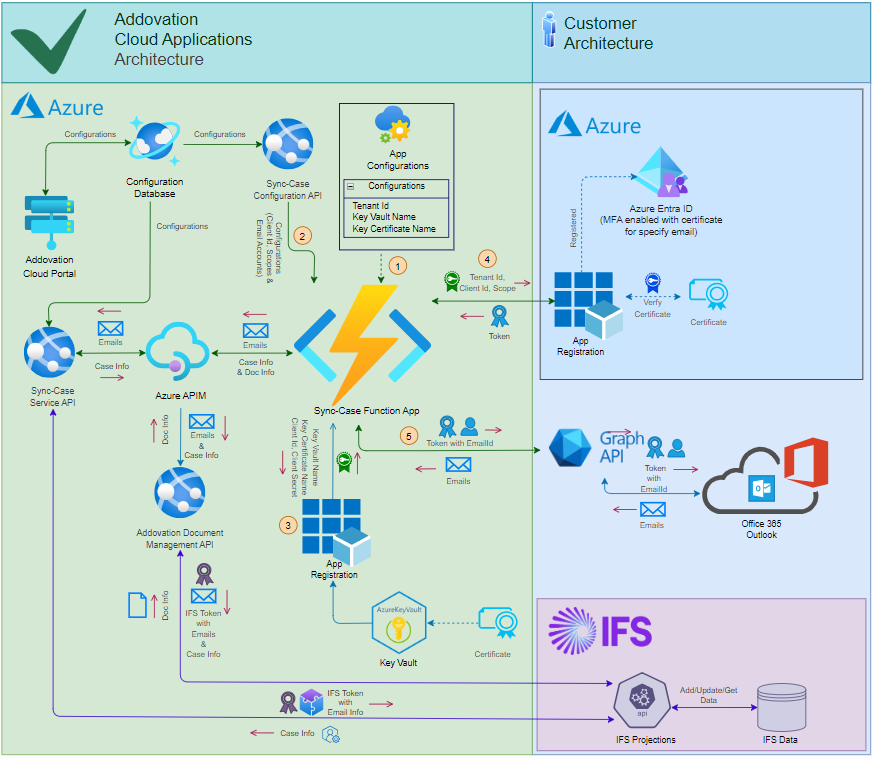
- The
Tenant ID,Key Vault Name, andCertificate Nameare stored in the Function App configurations. - The
Client ID,Scopes, andEmail IDare stored in the subscription configuration. - Using the
Key Vault NameandCertificate Name, the Function App retrieves anX509Certificate2certificate. - The retrieved certificate, along with the
Tenant ID,Client ID, andScope, is sent as request parameters to obtain an access token from the Azure App Registration. - The access token is then used to read and send emails using the specified
Email AccountusingMicrosoft Graph API
oAuth2 Authentication
Email accounts can be accessed using an oAuth2 token in DocAgent with user credentials. However, it is essential to note that Multifactor Authentication (MFA) must be disabled on the email account to enable oAuth2-level access.
Technologies supported
The following technologies are supported or used by Addovation DocAgent.
E-Mail Access Methods
- MailKit
- Microsoft GraphAPI
E-Mail Protocols
- IMAP
- POP3
- SMTP
- Transport Layer Security (TLS) cryptographic protocols (1.2 and 1.3)
Microsoft Azure technologies used
Host by Addovation
- Azure Function App
- Azure App Services
- Azure API Management
- Azure Cosmos DB (Core SQL)
Host by Customer
- Azure Entra ID - App Registration
- Azure Application Insights
- Log Analytics Workspace
Requirements
Access Requirement
- A valid
subscription keyis required to provide authorized access to Addovation DocAgent Service API and Document Management API
E-Mail Account Requirement
- A
valid E-mail accountis required to process Addovation DocAgent functions.
Multifactor Authentication Requirements
- A
Azure Key VaulttoCertificateand be accessible forFunction App. Azure Entra App registrationcertificate-basedaccess levelApp permissionshould be provided to read and send emails for specific users
Channel Requirements
- Mandatory configurations are required to run a channel in an active state
- A
tenant Idrequired to configure in order restrict channel for customer tenant - A unique
Environment Namerequired per tenant to support multiple Function Applications - A
unique Channel nameis required per each tenant Id - At least one
unique e-mail accountis required per channel
IFS Information Requirements
- The service requires
IFS server extension - IFS projections should be published, and endpoint must be presented along with required fields to configurations.
Object keyvalues required to configure in Map Fields.IFS default valuesrequired to configure in Map Fields.- Any required fields required properly configure in Map Fields.
IFS Access Requirements
- A service user in IFS with required permissions
- IAM client account with connected to specified service user
Document Management Service Requirements
Document classrequired, if document check-in is enabled.Document formatis option but requires if customer wish to check-in documents for a certain document format.Document Typeshould be available in EDM basic data for MSG or EML formats, depends on Mail Format configuration.Document Typeshould be available in EDM basic data for any document type customer wish to check-in as attachments.Logical Unit Name (LuName)andKeyRefrequired properly configure to check-in documents.
Networking Requirements
By default, the service supports the following networking options:
- Azure Virtual Network and
- Azure site-to-site VPN
This is required for communication between your IFS instance and the Addovation Cloud.
Other networking technologies can used. Contact us for more information.
Azure Configuration Requirements
If customer wish to publish DocAgent on their premise, an azure portal is required with a subscription and subscription pricing plan which allow will to create and maintain following resources
- App Registration
- Resource Groups
- Azure Function
- Azure Storage
- Azure App Service
- Azure Insights
- Log Analytics Workspace
Windows Operating system should support in azure portal alone with
.Net 5 or higher for app services and .Net Core 3.1 or higher for Azure Functions
IFS Applications Requirements
We currently support the following ERP systems:
- IFS Cloudâ„¢ 21R1, and later
Data CRUD operations are performed using IFS projections, therefore Addovation DocAgent service endpoint must be whitelisted in IFS environment.
GDPR Compliance
Addovation DocAgent is built with GDPR regulations in mind and keeps a minimum of information by default.
The following is logged in the customer's Azure Application Insight logs:
- Tenant Id
- Tenant Name
- E-Mail Id (email address of the configured channel)
- E-Mail Message Id (unique id)
- E-Mail Subject
Addovation DocAgent requires the information listed above to monitor and resolve problems (information, errors and warnings) such as when an e-mail fails to process, the IFS server does not respond, e-mail account authorization fails, or other problems processing incoming e-mails.
In addition to the information above DocAgent can be configured to log additional information when a customer or the situation requires it and these values are optional. The following fields may be logged:
- Sent From (e-mail address)
- Display Name (sender's name)
- Description (message body)
- Mail Direction (In/out)
- Sent To (email addresses)
- Sent To CC (email addresses)
- Message Date
- Customer Name (customer in IFS which is connected to the contact/sender)
Limitations
- Addovation DocAgent supports most e-mail accounts (IMAP/POP3), but note that
Google Mail (Gmail)is not supported. - Addovation DocAgent supports Microsoft 365 (Exchange Online).
- The service checks e-mail at a rate limited by the customer's e-mail system
- The service is based on having a single e-mail account (address) as both Sender and Channel, which means that a shared e-mail Group account cannot be used
- THe maximum attachment size supported is
150 MB. - Addovation DocAgent has the same restrictions and validation requirements as the customer's IFS application.
- IFS must be configured (Basic Data) in order for the Addovation DocAgent to store information in the customer's Logical Units (for example DocMan and CallCenter).
- An e-mail account cannot be used in multiple channels under any circumstances.
- Changing the e-mail subject will likely cause problems identifying the email as part of an existing thread and/or any object connection(s).
- Invalid or incomplete configurations might not provide the expected result in IFS.