Addovation Sync - CRM - White Paper
Last Updated: 2024-12-02

Overview
Addovation Sync - CRMis a cloud-basedbidirectionalsynchronization engine for replicating CRM information betweenMicrosoft 365 Exchange Online and IFS.It uses
standard IFScomponent for communicating with IFS andMicrosoft Graph APIfor handling the communication with Exchange online.
Infrastructure & technology
- The solution can be illustrated as following:
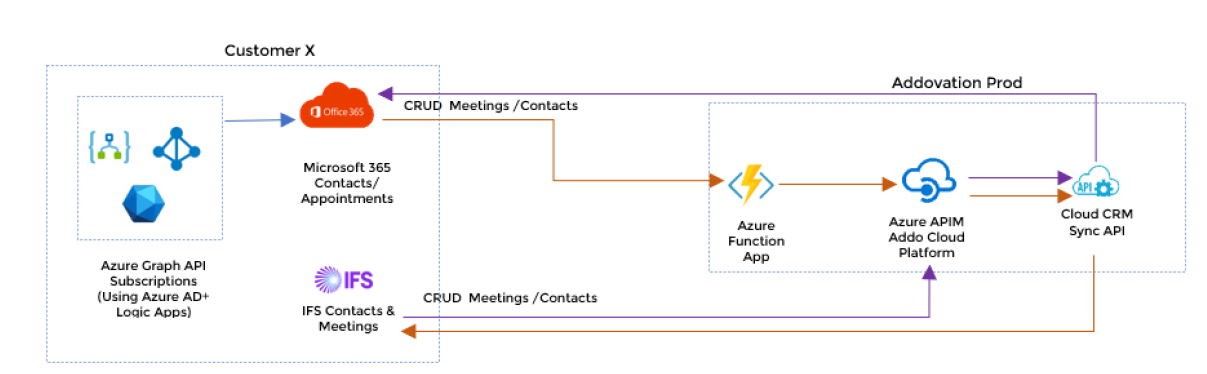
Microsoft Graph APIis used for communication to and from Microsoft 365.OAuth2is used as authorization method (token from Azure AD).- Requires an application which is registered in Azure AD for the customer.
- Multi-Domains are supported.
- Addovation Sync - CRM uses
Azure Application Insightsfor logging of the transactions.
System requirements
- Deploy APIs on IFS and configure IFS Connect
(Queue). - App registration in Azure Active Directory.
- Need Azure AD user group with sync enabled users.
- Addovation needs the ability to deploy APIs, configure IFS Connect and to add Custom fields and permission sets in IFS Applications.
- Need Azure Logic Apps and Application Insights on customer tenant.
- Need to deploy add-in on customer domain if decided to use Addovation add-in for synchronisation.
Note
There is no support for Azure Stack nor Microsoft Exchange on-premise.
Configuration requirements
- The application must be registered in the
customer’s Azure Active Directory.
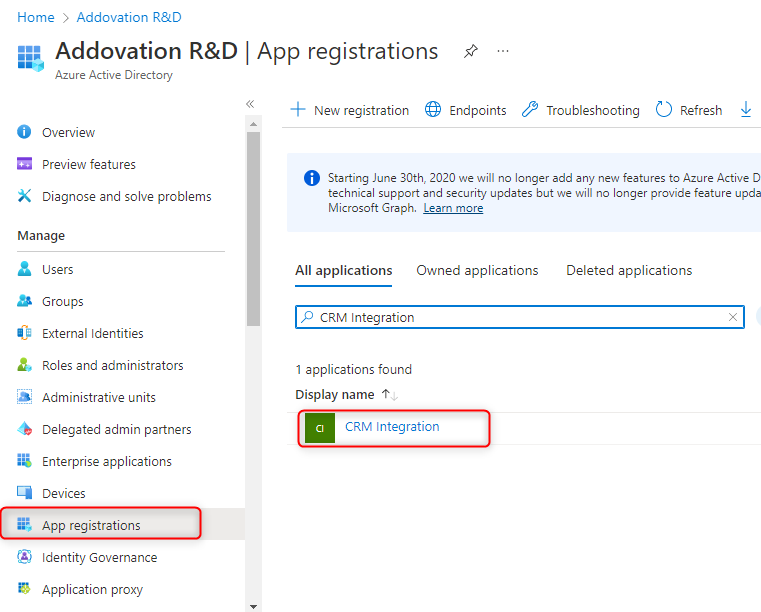
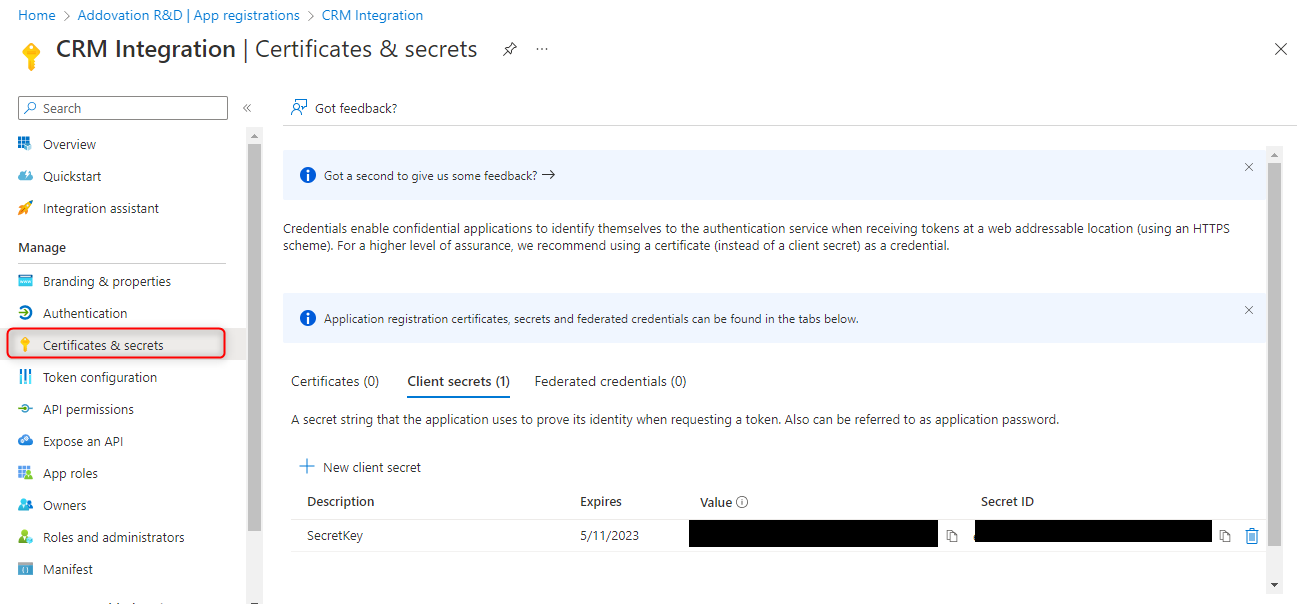
- This requires
ClientId & ClientSecretfrom Azure AD.
Addovation must be able to install
custom field(s)andpermission setsin IFS Applications.An
integration useris required to run the service.
Note
Refer ‘Setup Guide’, to configure logic apps and azure application insights.
Compatibility matrix
- Addovation Sync - CRM is compatible with/requires the IFS Applications:
| SUPPORTS / REQUIRES | VERSION / BITNESS | M365 CRM |
|---|---|---|
| IFS APPLICATIONS | 7 |  |
| IFS APPLICATIONS | 8 | |
| IFS APPLICATIONS | 9 | |
| IFS APPLICATIONS | 10 | |
| IFS CLOUD | 21R1 |  |
| IFS CLOUD | 21R2 | |
| IFS CLOUD | 22R1 | |
| IFS CLOUD | 22R2 upd 3 | |
Note
If user needs to use Addovation Add-in, IFS Applications should support projections.
Limitations
Non-standard authentication configurations towards IFS Applications is not supported. Installations where customizations that might affect standard APIs are being used is not supported. For a full specific list of used queries and APIs please contact Addovation.
- Events that are marked as
privatein Microsoft365 will not be synchronized. - Possibility to use
Addovation Add-inin Microsoft 365 Meeting to connect to the correct customer/ business lead. - Possibility to use
Addovation Add-inin Microsoft 365 Contact to connect to the correct customer/ business lead. - Synchronization can only be configured to use either
main representative contacts and events.
Note
Please read the functional specification for detailed list of requirements for the solution.
GDPR compliance
Addovation Sync - CRM obeys regulations controlled by
GDPRand communicates in the same way as IFS Applications Enterprise Explorer 9 and 10.The information that is being stored is on the
Azure Cosmos DBthat are settings in the configuration file:
Client ID/ Client Secret : IDs which grant access for Addovation Sync - CRM Service to communicate with Microsoft applications (Outlook & Calendar) with specified access level.
IFS User/Password/AppOwner: Credential which are used to login to IFS applications.
Instrumentationkey: This is used to access the specified Azure Application Insights in Customer which is connected with Addovation Sync -CRM Service. ADM10_1040.10.150
Share Point Site: The SiteId of the created SharePoint site of the customer, for the domain.