Addovation Share for Teams
Last Updated: 2025-12-18
Modern workplace is here to stay and offers a whole new world for productivity and collaboration. Employees expect to work securely from anywhere and on any device which is great! However, this imposes new challenges in terms of keeping relevant information attached to your important business objects and up to date with ease. With Addovation, we bridge the gap between IFS Cloud and Microsoft Teams allowing you to connect channels to specific business objects in the ERP; this can be customers, projects as well as business opportunities. Any logical unit is supported!
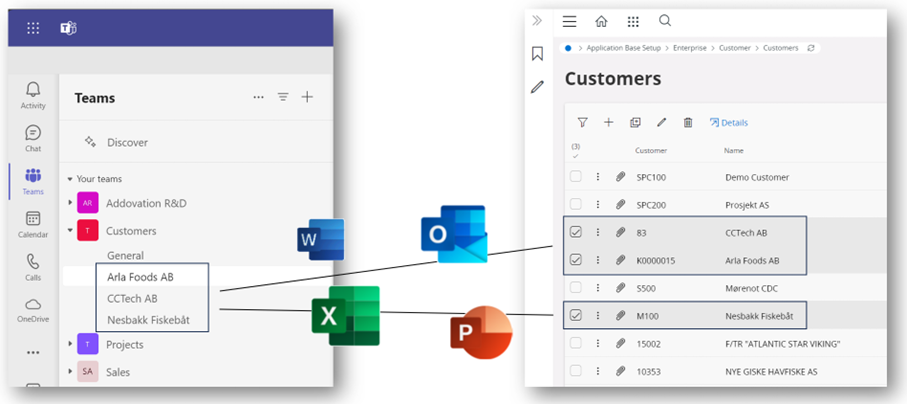
What you get!
- Easy access documents attached to business objects from within Microsoft Teams.
- A solution that adheres to your document management rights and access policies.
- A way of streamlining your document handling processes without losing flexibility.
Demo - Connecting Teams channels to business objects
Demo - Check in files from Teams
Key benefits
- Supports one or several business objects.
- Check out- / check in from Teams.
- View checked out documents.
- Create new revisions of documents.
- Access company templates.
- Share document from IFS Cloud directly to external recipients.
- Set password, expiration etc.
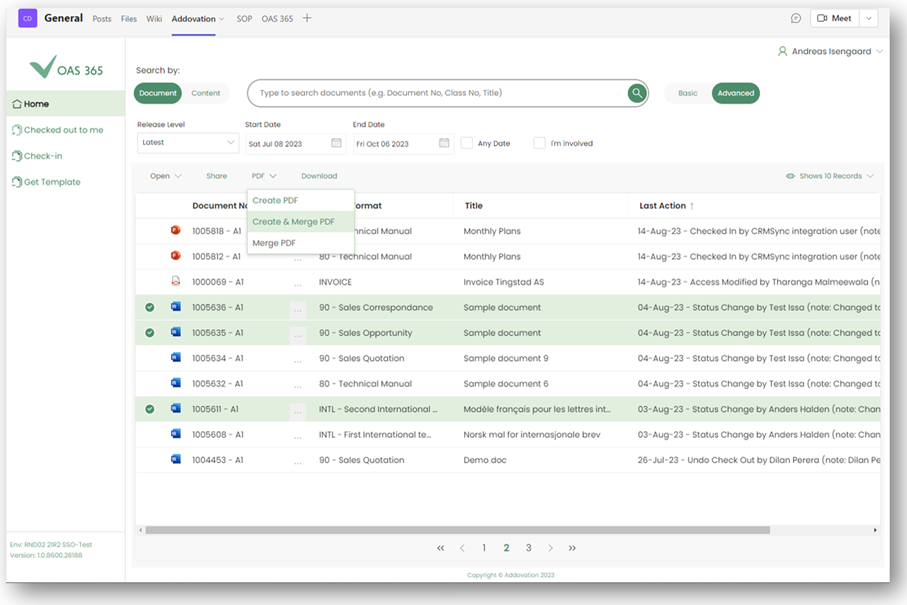
- Create PDF of Word documents.
- Create several PDFs and merge in one single operation.
- Create view copies upon check in.
Empower Microsoft Teams with Addovation!
Required competencies
- Microsoft Azure knowledge.
- Microsoft Intune and Teams management.
- IFS Document Management.
- IFS Lifecycle Experience.
Technical documentation
Downloads
Release notes
| Release date | Version | Comment |
|---|---|---|
| 2025-12-17 | Production 1.2.43 | Enhancements & Improvements Security – Enabled end-user authentication for accessing IFS Working Documents - Introduced Working Documents to help users manage downloaded and checked-out documents, enabling View, Edit, and Check-In operations for IFS documentsSearch Documents - Improved document search using IFS standard projections, with added support for file format filtering and view access filteringCheck in New - Limited to Microsoft Teams channel files, with checked-out and downloaded documents moved to Working Documents |
| 2025-12-17 | Preview 1.2.43 | Enhancements & Improvements Working Documents - Performance Improvements for Working Documents Working Documents - Standardized the Document Details panel to align with other Addovation Share products All Documents - Document Search Using Standard Projections (Customers can activate this option via a simple configuration setting) Improved Error Handling and User Feedback A notification is shown directing users to use the Channel App when opened from the General Channel or General tab Bug Fixes Enhanced the user login prompt displayed when authentication tokens expire Added missing toast notifications for Deleting OneDrive documents during check-in and Document check-out actions Check In New - Improved Dark Theme compatibility for the Class / Format selection panel Check In Exiting - Resolved an issue where the Check-In Existing button was not functioning when View Copy was mandatory during Check-In New RevisionAll Documents - Fixed an issue where IFS documents failed to load for certain object connections when using custom projections |
| 2025-12-03 | Preview 1.2.42 | Enhancements & Improvements Check-In Existing - Improved Check-in Existing Flow Check-In Existing - Warning Notification for Cross-User Checkout Check-In New - Dark Theme Compatibility Improvements Check-In New - Optimized the Recently Used Objects Frame Size HandlingBug Fixes Working Documents - Fixed Crash When Cancelling checkInNewRevision Process Working Documents - Fixed Open IFS Cloud Not Working in Working DocumentsWorking Documents - Fixed Missing Owner in Document Details Window (Absolute Test) Check-In Existing - Fixed Missing Notification Toast on Check-In Existing with Delete OneDrive OriginalCheck-In Existing - Error Handling for Special Characters During Check-In Existing Check-In New - Fixed Timeout Error in Check-In New Window Other fixes and improvements |
| 2025-11-19 | Preview 1.2.41 | New Features and Enhancements Working Documents - Implemented the Working Documents concept to simplify the document handlingWorking Documents - New user-friendly Card View Layout Working Documents - Check-In Existing support addedSecurity - IFS End-User Login Support Introduced Check-In New - Migrated to Standard Projections (excluding Object Connection Advanced Search) Check-In New Revision - Migrated to Standard Projections |
| 2023-08-30 | 1.0 | First release to market |